DATA ANALYSIS/TIL

[Day23] EDA(1)

yel1nk 2023. 5. 30. 17:50

EDA(Exploratory Data Analysis)

  • 탐색적 데이터(자료) 분석
  • 데이터 분석 이전에 그래프나 통계적인 분석을 통해 데이터를 직관적으로 이해
  • 데이터 자체가 가지고 있는 그대로의 의미를 파악
  • 목적
    • 데이터 수집 의사 결정
    • 데이터 맞는 모델 선정
    • 변수들 간의 관계 파악
  • 순서
    1. 데이터 가져오기(모듈 세팅)
    2. 데이터 정보 확인
    3. 데이터 전처리
    4. 결측치 확인
    5. 이상치 확인
    6. 데이터 시각화 -> 표, 그래프

성적 데이터 (Outlier)

  1. 데이터 가져오기
import pandas pd
out_df = pd.read_excel('outlier.xlsx')
  1. 데이터 정보 확인
out_df.head()
out_df.info()
out_df.describe()

out_df = out_df.set_index('번호')
out_df['국어'] = out_df['국어'].replace(-57, 57)
  1. 이상치 확인
  • 이상치(outlier) : 사분위에서 특정 범위(+- IQR * 1.5)를 초과하는 경우 -> boxplot으로 확인
import matplotlib.pyplot as plt
plt.boxplot(out_df)
plt.show()

이상치 확인 전

out_df['국어'] = out_df['국어'].replace(810, 81)
plt.boxplot(out_df)
plt.show()

이상치 확인 후

# 과목별 성적 평균 -> 바 차트로 나타내기 
m = out_df.mean()
plt.bar(out_df.columns, m)
# plt.bar(m.index, m)
plt.show()

# 순서대로 -> 사분위값 -> 상위 몇%
# q1(25%), q2(50%), q3(75%)
q1 = out_df.quantile(0.25)
q2 = out_df.quantile(0.5)
q3 = out_df.quantile(0.75)
IQR = q3 - q1 # 50%에 해당되는 데이터
limit = IQR * 1.5 # [-1imit < 데이터 < +limit] 일반적인 데이터 허용 범위

날씨 데이터 (Weather)

import pandas pd
weather_df = pd.read_csv('weather.csv', encoding='cp949')
weather_df = weather_df.set_index('일시')
# pd.to_datetime() : object -> datetime
weather_df.index = pd.to_datetime(weather_df.index, format='%Y-%m-%d')

결측치 확인하고 처리하기

# 컬럼별 결측치 갯수 확인 
weather_df.isna().sum()  
'''
최저기온(°C)             6
최고기온(°C)             6
일강수량(mm)             6
최대 순간 풍속(m/s)        6
평균 풍속(m/s)           8
최대 순간 풍속 풍향(hhmi)    6
'''
# Boolean -> Boolean Indexing : 결측치 위치 확인
weather_df['최저기온(°C)'][weather_df['최저기온(°C)'].isna()]
'''
일시
2010-12-08   NaN
2010-12-09   NaN
2010-12-10   NaN
2010-12-11   NaN
2010-12-12   NaN
2010-12-13   NaN
'''
  • 시간 흐름에 따른 데이터 -> 시계열
  • 비어있는 값 앞뒤로 데이터 경향을 파악
weather_df.loc['2010-12-01':'2010-12-31']

# 1. 일강수량의 결측치를 0으로 채우기 
weather_df['일강수량(mm)'] = weather_df['일강수량(mm)'].fillna(0)
weather_df['일강수량(mm)'].isna().sum() # 값이 채워졌는지 확인 -> 0

# 2. 최저기온, 최고기온의 결측치를 사분위값 50% 값으로 채우기
weather_df.loc['2010-12-05':'2010-12-15'].describe()
weather_df['최저기온(°C)'] = weather_df['최저기온(°C)'].fillna(0.4)
weather_df['최고기온(°C)'] = weather_df['최고기온(°C)'].fillna(2.9)

# 3. 최대 순간 풍속의 결측치를 평균값으로 채우기
weather_df.loc['2010-12-06':'2010-12-15'].describe()
weather_df['최대 순간 풍속(m/s)'] = weather_df['최대 순간 풍속(m/s)'].fillna(24.1)

# 4. 평균 풍속의 12월 4일부터 18일까지 결측치를 평균값으로 채우기
weather_df['2010-12-04':'2010-12-18'].describe()
weather_df['평균 풍속(m/s)'] = weather_df['평균 풍속(m/s)'].fillna(4.642857)

# 5. 최대 순간 풍속 풍향의 12월 7일부터 17일까지 결측치를 평균값으로 채우기
weather_df.loc['2010-12-07':'2010-12-17'].describe()
weather_df['최대 순간 풍속 풍향(hhmi)'] = weather_df['최대 순간 풍속 풍향(hhmi)'].fillna(305.38)

weather_df.info() # non-null 확인

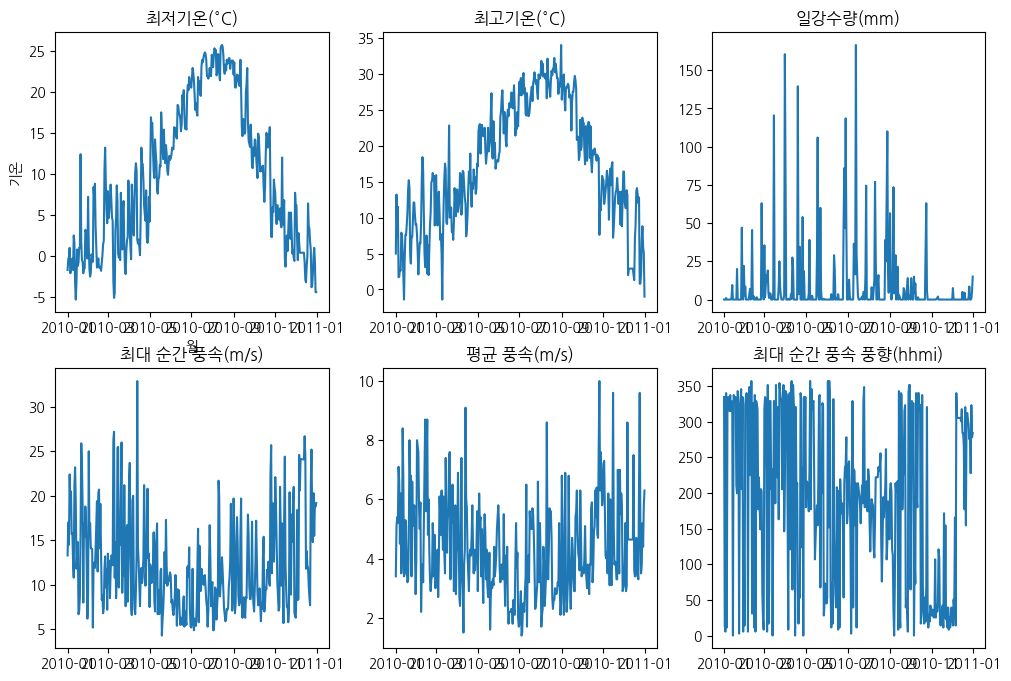
데이터 시각화

!pip install koreanize-matplotlib  # 한글 출력을 위한 추가 라이브러리
import matplotlib.pyplot as plt
import koreanize_matplotlib
# 그래프 변수
x = weather_df.index  # 시간순서

y1 = weather_df['최저기온(°C)']
y2 = weather_df['최고기온(°C)']
y3 = weather_df['일강수량(mm)']
y4 = weather_df['최대 순간 풍속(m/s)']
y5 = weather_df['평균 풍속(m/s)']
y6 = weather_df['최대 순간 풍속 풍향(hhmi)']
plt.figure(figsize=(12, 8))

# subplots
# plt.subplot(행, 열, 인덱스)
plt.subplot(2, 3, 1)
plt.title('최저기온(°C)')
plt.xlabel('월')
plt.ylabel('기온')
plt.plot(x, y1)

plt.subplot(2, 3, 2)
plt.title('최고기온(°C)')
plt.plot(x, y2)

plt.subplot(2, 3, 3)
plt.title('일강수량(mm)')
plt.plot(x, y3)

plt.subplot(2, 3, 4)
plt.title('최대 순간 풍속(m/s)')
plt.plot(x, y4)

plt.subplot(2, 3, 5)
plt.title('평균 풍속(m/s)')
plt.plot(x, y5)

plt.subplot(2, 3, 6)
plt.title('최대 순간 풍속 풍향(hhmi)')
plt.plot(x, y6)

plt.show()

weather_df.index # DatetimeIndex
'''
['2010-01-01', '2010-01-02', '2010-01-03', '2010-01-04', '2010-01-05', 
'2010-01-06', '2010-01-07', '2010-01-08','2010-01-09', '2010-01-10',
...
'2010-12-22', '2010-12-23', '2010-12-24', '2010-12-25', '2010-12-26', 
'2010-12-27', '2010-12-28', '2010-12-29', '2010-12-30', '2010-12-31']
'''

weather_date = pd.Series(weather_df.index)
'''
0     2010-01-01
1     2010-01-02
2     2010-01-03
3     2010-01-04
4     2010-01-05
         ...    
360   2010-12-27
361   2010-12-28
362   2010-12-29
363   2010-12-30
364   2010-12-31
'''

# '월' 행 추가
weather_df['월'] = weather_date.dt.month.values 
# weather_df['월'] = weather_date.dt.month  # 인덱스 값이 달라서 안 들어감

groupby

  • groupby([기준이 될 데이터])[가져올 데이터]
  • 기준 데이터 -> 범위를 나눔 -> (처리할) 수치 데이터
  • 월별 / 기온, 풍속 ...
x_month = weather_df['월'].unique()

month_low_temp = weather_df.groupby(weather_df['월'])['최저기온(°C)'].mean()
month_high_temp = weather_df.groupby(weather_df['월'])['최고기온(°C)'].mean()
month_daily_vol = weather_df.groupby(weather_df['월'])['일강수량(mm)'].mean()
month_wind_speed = weather_df.groupby(weather_df['월'])['최대 순간 풍속(m/s)'].mean()
month_wind_mean = weather_df.groupby(weather_df['월'])['평균 풍속(m/s)'].mean()
month_wind_dic = weather_df.groupby(weather_df['월'])['최대 순간 풍속 풍향(hhmi)'].mean()
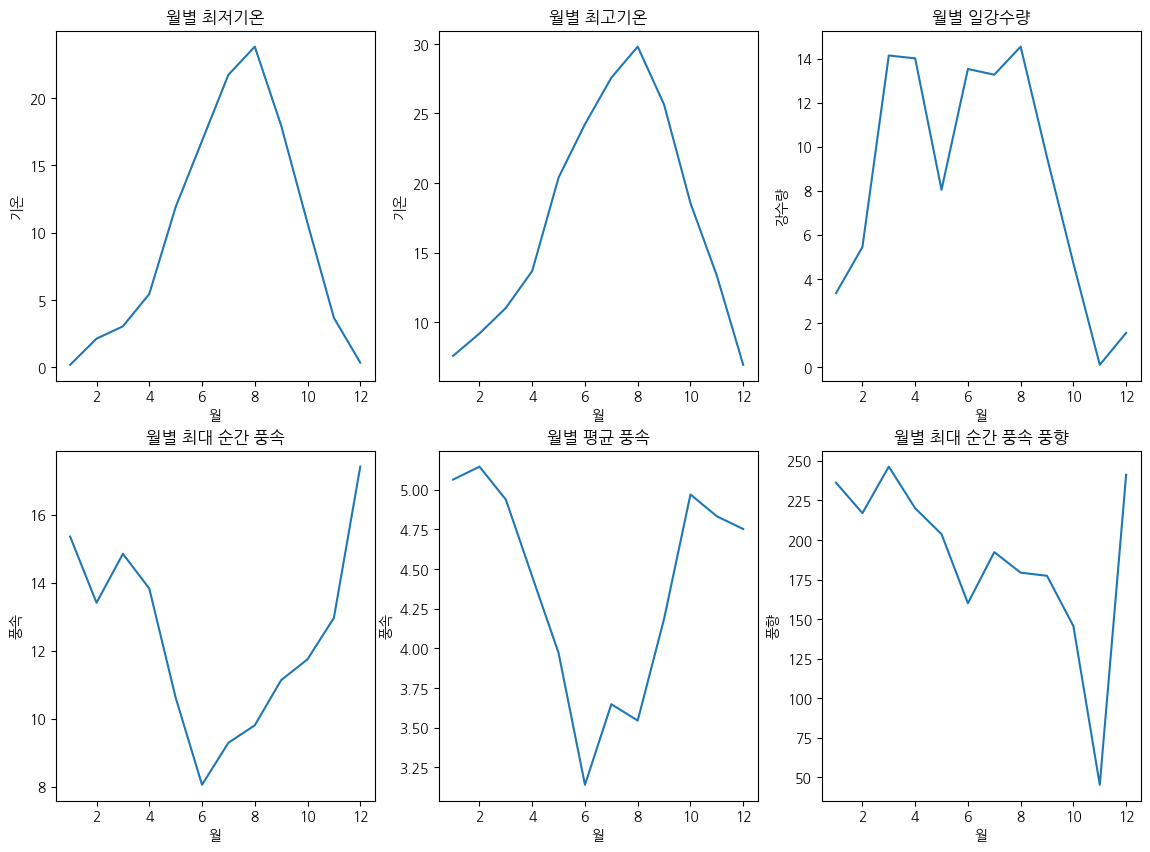
# groupby 월별 데이터 -> 그래프 
plt.figure(figsize=(14, 10))

plt.subplot(2, 3, 1)
plt.title('월별 최저기온')
plt.xlabel('월')
plt.ylabel('기온')
plt.plot(x_month, month_low_temp)

plt.subplot(2, 3, 2)
plt.title('월별 최고기온')
plt.xlabel('월')
plt.ylabel('기온')
plt.plot(x_month, month_high_temp)

plt.subplot(2, 3, 3)
plt.title('월별 일강수량')
plt.xlabel('월')
plt.ylabel('강수량')
plt.plot(x_month, month_daily_vol)

plt.subplot(2, 3, 4)
plt.title('월별 최대 순간 풍속')
plt.xlabel('월')
plt.ylabel('풍속')
plt.plot(x_month, month_wind_speed)

plt.subplot(2, 3, 5)
plt.title('월별 평균 풍속')
plt.xlabel('월')
plt.ylabel('풍속')
plt.plot(x_month, month_wind_mean)

plt.subplot(2, 3, 6)
plt.title('월별 최대 순간 풍속 풍향')
plt.xlabel('월')
plt.ylabel('풍향')
plt.plot(x_month, month_wind_dic)

plt.show()

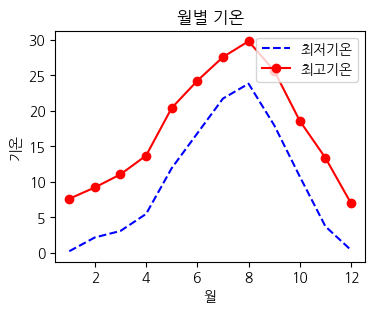
# 두 기온 그래프를 하나의 그래프 안에 표시
plt.figure(figsize=(4, 3))

plt.title('월별 기온')
plt.xlabel('월')
plt.ylabel('기온')

plt.plot(x_month, month_low_temp, '--b', label='최저기온')
plt.plot(x_month, month_high_temp, 'o-r', label='최고기온')

plt.legend(loc='upper right')
plt.show()

# 일강수량 그래프를 바 차트로 나타내기 -> 데이터 타입에 따라 적절한 그래프 선택하기 
plt.figure(figsize=(4, 3))
plt.title('월별 일강수량')
plt.ylabel('월')
plt.xlabel('강수량')
# plt.barh(y, x)
plt.barh(x_month, month_daily_vol)

plt.show()

# 1월 데이터 -> groupby 필요없음. 비교가 아니고 조건
jan = weather_df[weather_df['월']==1]
x_day = jan.index.day
# 1월 데이터를 subplot 이용해서 2x3 으로 그려주세요. -> 강수량은 BAR 그래프로
plt.figure(figsize=(14, 8))

# subplots 간의 간격 조절 
plt.subplots_adjust(left=0.125, bottom=0.1, right=0.9, top=0.9, wspace=0.2, hspace=0.35)

plt.subplot(2, 3, 1)
plt.title('최저기온')
plt.plot(jan['최저기온(°C)'])

plt.subplot(2, 3, 2)
plt.title('최고기온')
plt.plot(jan['최고기온(°C)'])

plt.subplot(2, 3, 3)
plt.title('일강수량')
plt.bar(x_day, jan['일강수량(mm)']) # 바 차트는 x, y를 입력해야함

plt.subplot(2, 3, 4)
plt.title('최대 순간 풍속')
plt.plot(jan['최대 순간 풍속(m/s)'])

plt.subplot(2, 3, 5)
plt.title('평균 풍속')
plt.plot(jan['평균 풍속(m/s)'])

plt.subplot(2, 3, 6)
plt.title('최대 순간 풍속 풍향')
plt.plot(jan['최대 순간 풍속 풍향(hhmi)'])

plt.show()

제주 음식점 데이터

import pandas as pd
food = pd.read_excel('jeju_food.xlsx')

food = food.set_index('순위') # 내부 칼럼을 인덱스로

데이터 전처리

# 중분류 카테고리 컬럼 삭제
food['중분류 카테고리'].unique()
# ['음식']
food = food.drop('중분류 카테고리', axis=1)

food['소분류 카테고리'].value_counts()
'''
한식       210
카페/찻집    152
전문음식      74
간이음식      49
외국식       12
음식점기타      3
'''
# 한식 top 10 -> head, slicing, iloc
food[food['소분류 카테고리']=='한식'].head(10) # iloc[0:10]
  • .str.contains('keyword') : boolean -> boolean indexing
# 스타벅스 찾기 
cafe = food[food['소분류 카테고리']=='카페/찻집']
sb = cafe[cafe['관광지명'].str.contains('스타벅스')]
# 국수 가게 찾기 
kr = food[food['소분류 카테고리']=='한식']
noodle = kr[kr['관광지명'].str.contains('국수')]

파이(pie) 그래프

  • list 값에 대한 순회 가능한 계산을 할 때 -> 리스트 컴프리헨션 사용 권장
category = food['소분류 카테고리'].value_counts()

plt.figure(figsize=(6, 6))
# plt.pie(비율, 레이블)
plt.pie(category, labels=category.index, autopct='%.1f%%')
plt.show()

'DATA ANALYSIS > TIL' 카테고리의 다른 글

[Day25] EDA(3)  (0) 2023.06.02
[Day24] EDA(2)  (0) 2023.06.01
[Day22] 데이터 핸들링(5)  (0) 2023.05.27
[Day21] 데이터 핸들링(4)  (0) 2023.05.25
[Day20] 데이터 핸들링(3)  (0) 2023.05.24